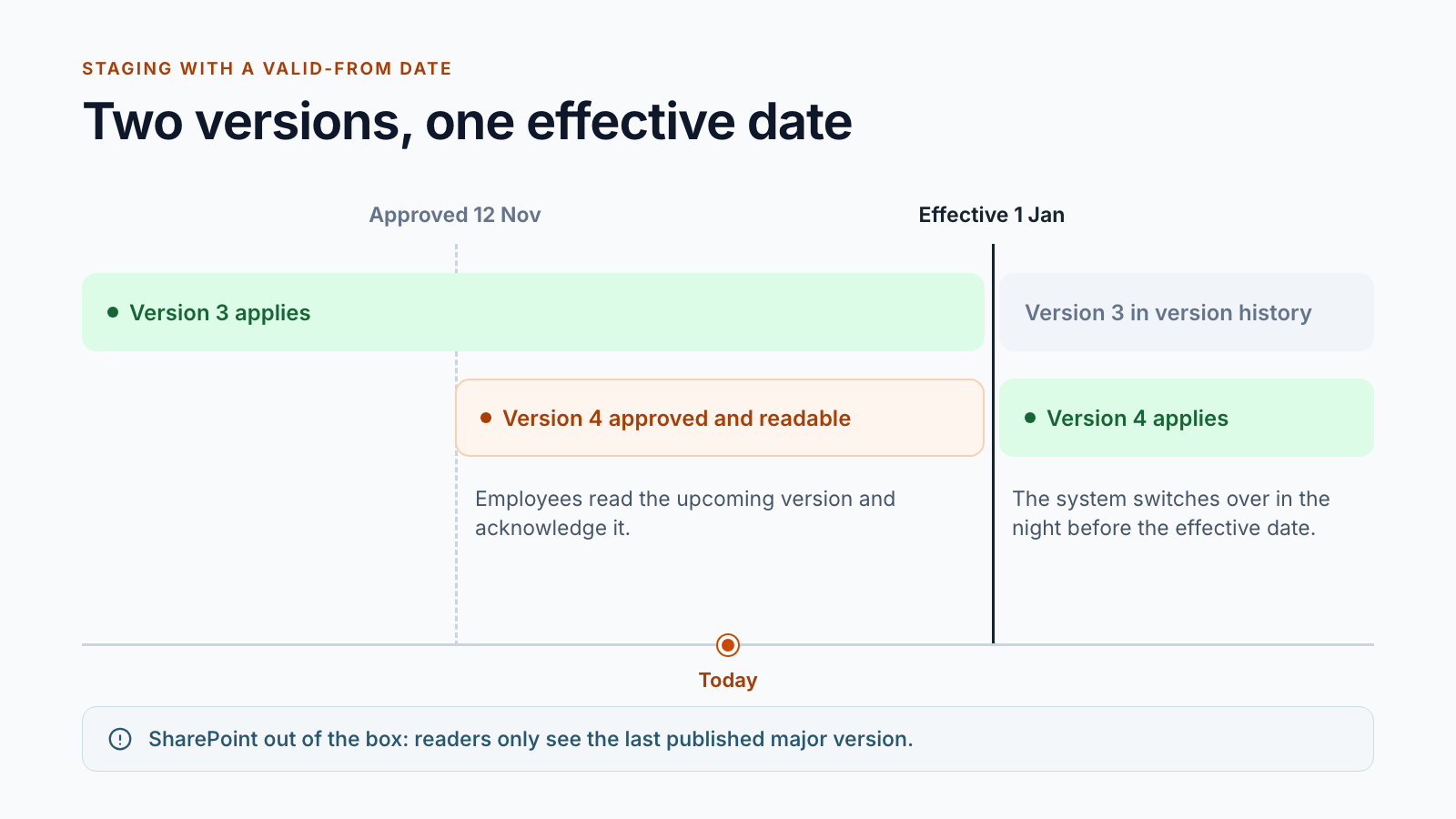
Staging with a valid-from date
If the valid-from date is in the future, the approved version goes into distribution. A nightly run switches over on the effective date. Until then, a version can also be withdrawn again.

Document control for Microsoft 365
Control your governing documents, from editing to archive.
Smarter DMS maps the lifecycle of your work instructions, procedures and policies in SharePoint: editing, review and approval, distribution ahead of the effective date, the valid version, archive. The core is proven in customer projects. Roles, stages and deadlines are aligned with your process.
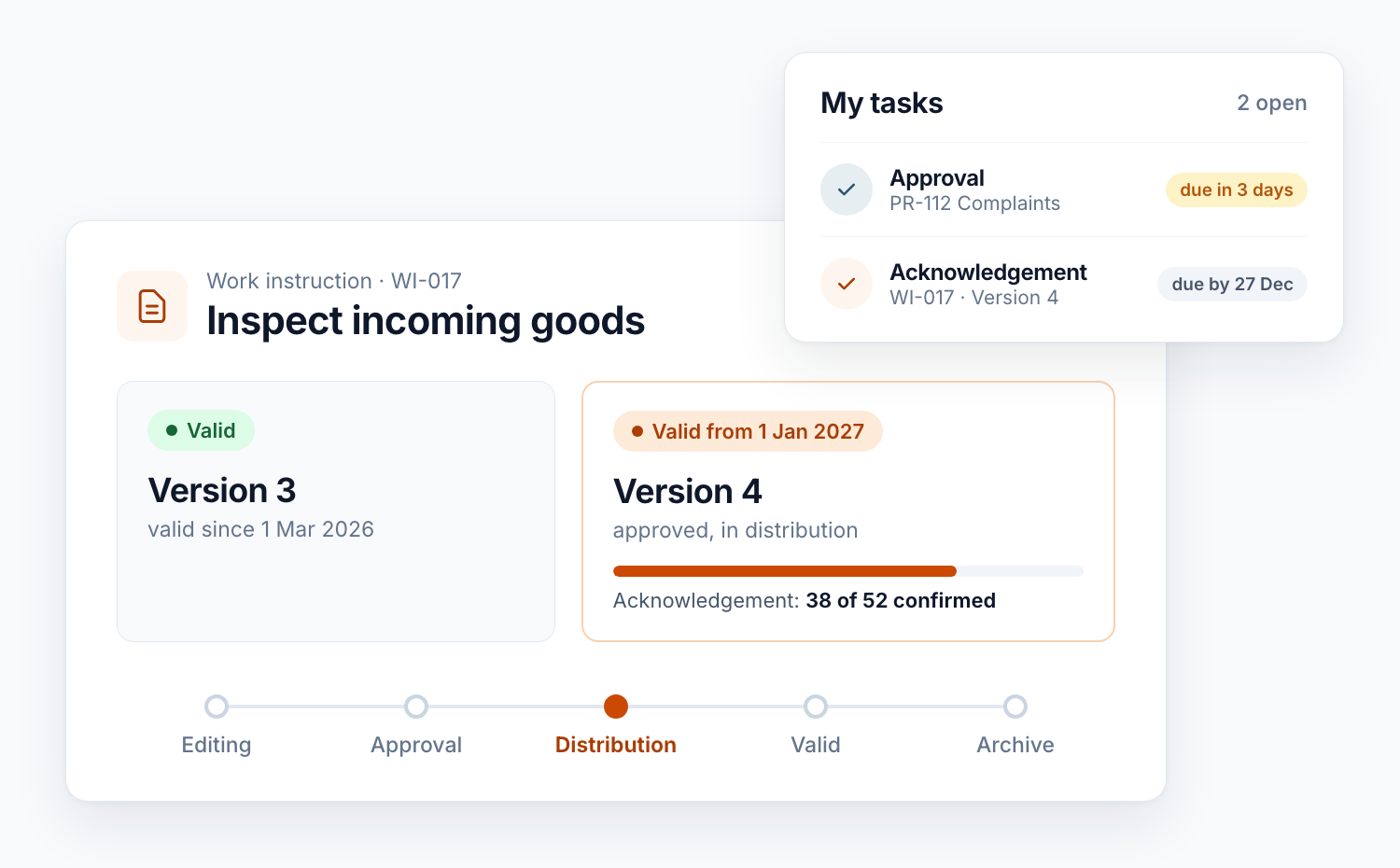
The problem
A work instruction is revised in November and applies from the turn of the year. Until then, the current version has to remain valid. At the same time, everyone affected should already be able to read and confirm the new one.
SharePoint only knows two states for this: draft or published. Once the new major version is published, it immediately replaces the previous one for readers. If it stays a draft, only editors can see it. An approved version that applies from a future date is not part of the standard.
Lifecycle
Each station is a separate library with its own permissions. Where a document sits determines who can see it and what may happen to it.
Editors work on the Word file with check-out, minor versions and comments. Feedback rounds collect expert input before approval starts.
Visible to
editors and contributors
Tasks for reviewers and approvers, in the order and with the rules of your organisation. If required, the document is locked against changes during approval.
Visible to
workflow participants
Approved but not yet in force: the upcoming version is readable and acknowledgements are running. The current version applies until the effective date.
Visible to
readers
On the valid-from date, the version becomes the valid one. Readers have read access only; the next revision continues separately in editing.
Visible to
everyone with access
Expired or withdrawn documents move to the archive. It remains traceable what applied when.
Visible to
as defined in your concept
If you do not need lead time, skip the distribution station: approved documents then apply immediately.
Building blocks
Every building block is in daily use at customers. You decide which ones your rulebook needs.
If the valid-from date is in the future, the approved version goes into distribution. A nightly run switches over on the effective date. Until then, a version can also be withdrawn again.
One to three stages, sequential or parallel, with a four-eyes rule, an upstream gate or joint approval by two managers. Deadlines, reminders and delegation are included.
Each person on the distribution list receives a task for the specific version. Reminders and escalation run automatically, and managers can pass the task on to their teams. The record is kept per person and version.
On approval, the Word file becomes a PDF with cover sheet, header and footer: title, version, scope, validity and approval date. Excel, Visio and CAD files stay in their original format.
An approval record keeps reviewer, approver, date and comment for each version. A change comparison shows old and new side by side, and the version history can be exported as a PDF.
Before expiry, the system reminds document owners. Depending on your rules, the document is extended, revised or archived, automatically or with its own approval.
The process map is the entry point, with full-text search and filters by document type, process and scope. Personal views show open tasks and the documents that concern a person.
One workspace for readers, editors and administrators, as a SharePoint page or as an app in Microsoft Teams. Notifications are sent by email from templates you maintain yourself.
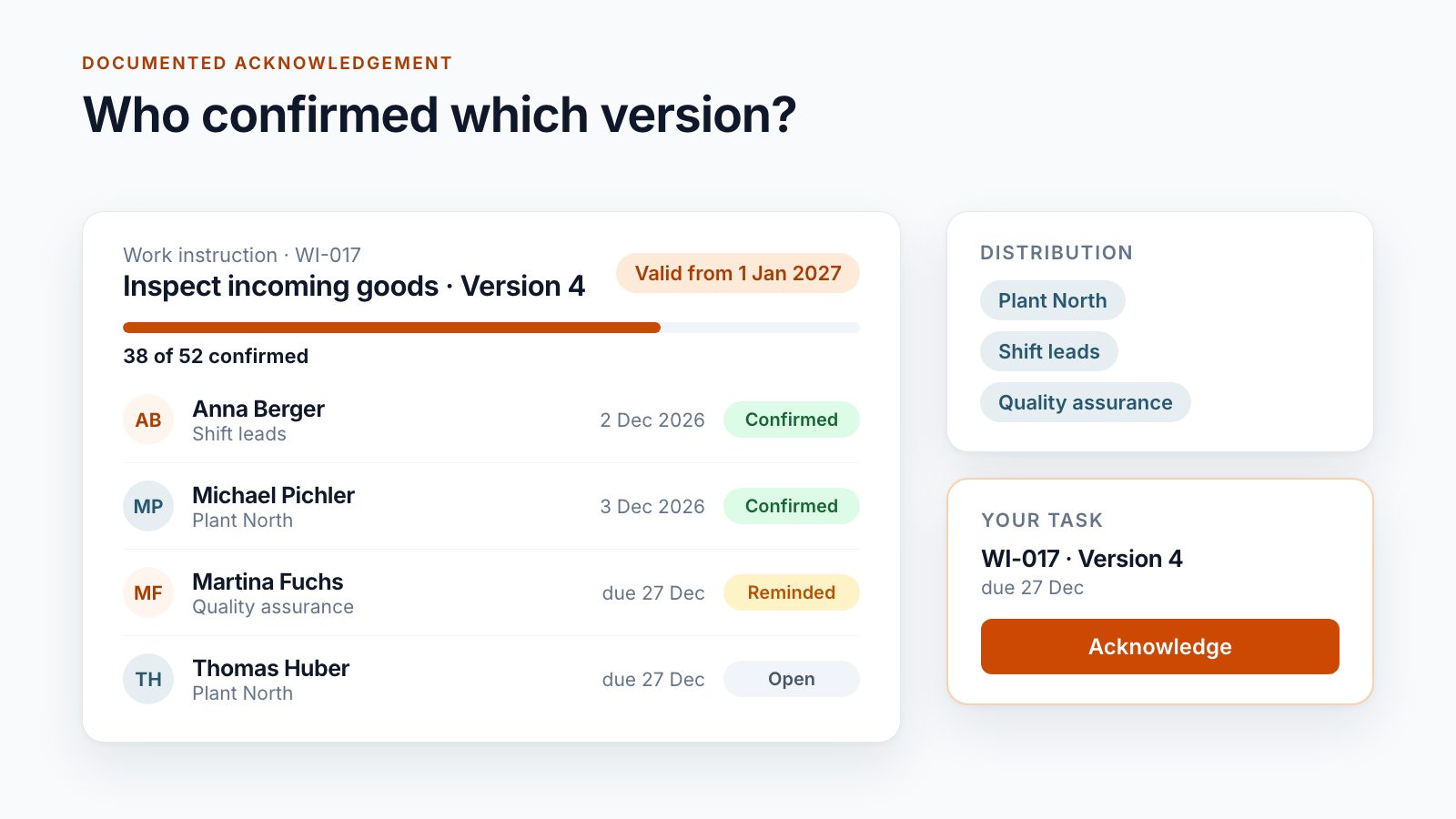
An opened document is not evidence. Smarter DMS creates a task for each person on the distribution list, tied to exactly one version. Confirmation is an active step, recorded with date and user account.
More than 500,000 documented acknowledgements for a single customer.
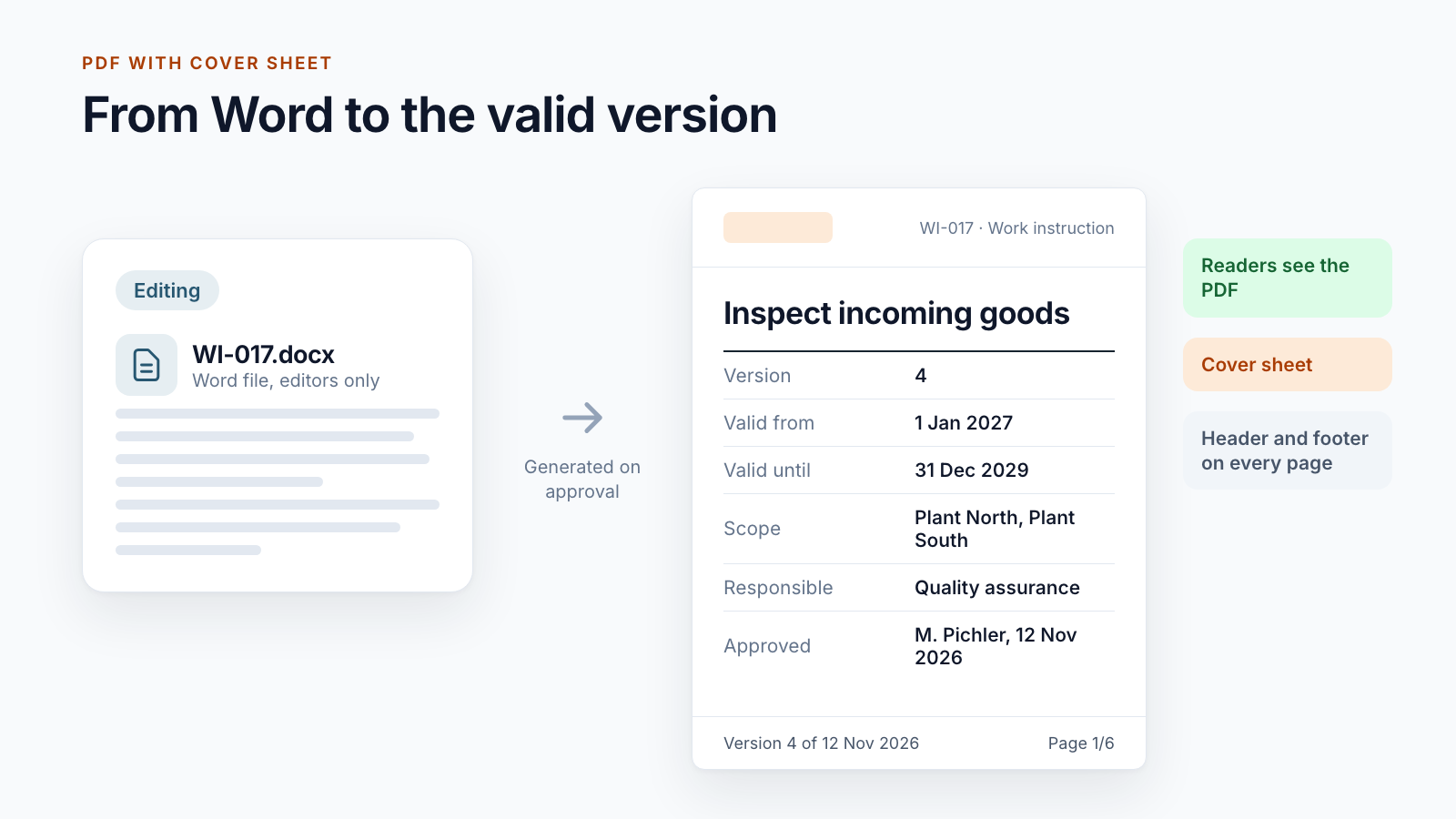
Editors write in Word. Readers receive a PDF that cannot be changed by accident and shows on every page which version they are looking at.
If required, the first page states that printed or downloaded copies are not subject to change control.
Core and customisation
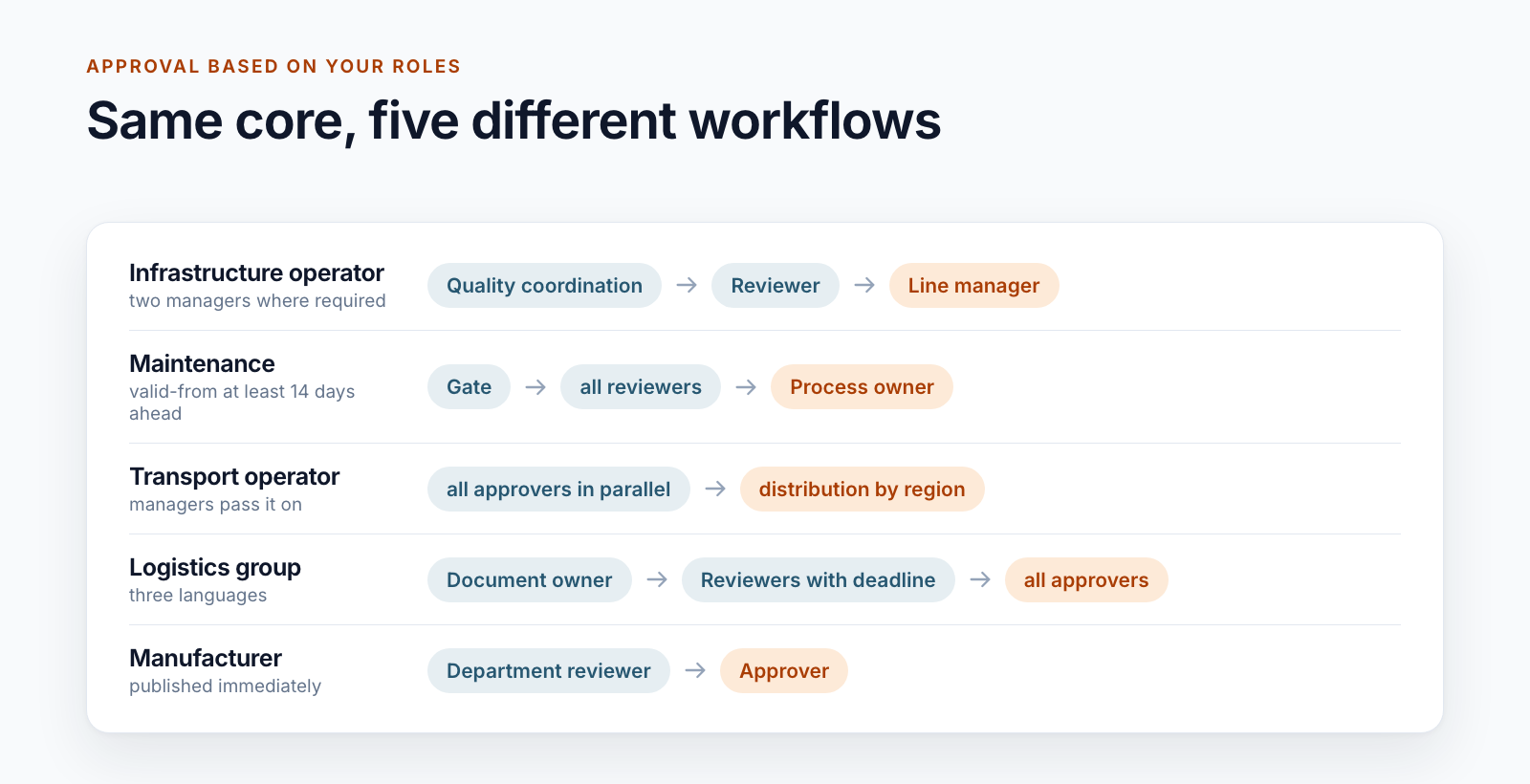
No two approval workflows are alike, as the five examples below show. That is why we do not deliver an off-the-shelf product, but a proven core that we configure for your rulebook with you and extend where your process requires it.
All five run on the same lifecycle. The differences are in roles, rules and deadlines.
Built-in tools or app?
Not every document library needs a DMS. For a team with a few documents that apply immediately, the built-in SharePoint tools are the right choice.
If the left column covers your case, you don’t need an app – you’ve already paid for the built-in tools. Smarter DMS exists for everything on the right.
Approach
We walk through your document lifecycle: document types, roles, approval stages, deadlines, distribution. The result is a workflow that business and IT both support.
Libraries, metadata, workflows and mail templates are built in a test environment. Special rules and interfaces are developed on top.
Existing documents move into the new system with metadata and version status, for example from SharePoint 2016. References between documents are checked along the way.
One area starts with real documents. What comes up there is incorporated before everyone switches.
Standards and organisations change. We support the solution and adapt it with you.
Technology
Smarter DMS uses the platform you already run. No second document system is added.
Smarter DMS is a proven solution core, not an installation package from a store. We bring the lifecycle, data model and workspace. Roles, approval stages, deadlines and special rules are configured for your process in the project and extended where needed.
For all that need controlled governing documents: quality, environmental, occupational health and safety and information security management, as well as an integrated management system that combines several standards in one rulebook. Documents can be assigned to several systems and filtered accordingly. Certification itself remains the responsibility of your organisation.
Smarter DMS makes it traceable who reviewed, approved and acknowledged which version and when, and separates editing from the valid version through permissions. Audit-proof storage in the legal sense additionally depends on retention, deletion protection and organisation. For this, the solution can be combined with retention policies in Microsoft Purview. For one customer, every published version is additionally handed over to the company’s archive system.
No. One customer works without staging and publishes immediately, another without acknowledgement, and others generate PDFs with a cover sheet. The lifecycle stays the same; you choose the building blocks.
No. The workflows run as dedicated services in Azure and store their state in SharePoint lists. You need SharePoint Online and an Azure subscription for the services.
Yes. In previous projects we migrated content from SharePoint 2016, including metadata and version status. References between documents are checked and rewritten in the process.
The effort depends on how close your workflow is to the existing core and which special rules, interfaces and migrations are added. After an initial conversation and a look at your process, you receive an assessment of effort and approach.
Further reading
The posts in this series look at individual building blocks and at the differences between workflows.
SharePoint offers a lot for document management. For controlled documents with an effective date, multi-stage approval and acknowledgement, built-in tools end.
Read postHow an approved document in SharePoint is readable before it applies: staging library, switch-over on the effective date and the questions to settle first.
Read postFive examples of approval workflows for controlled documents in SharePoint. Which questions shape the workflow and why a standard workflow rarely fits.
Read postSharePoint has no read confirmation for documents. What a record of acknowledgement must contain and how distribution lists, deadlines and reminders interact.
Read postWhat ISO 9001 clause 7.5 requires for the control of documented information, what SharePoint covers and where controlled documents need more.
Read postOne rulebook for quality, environment, occupational safety and information security: how process map, metadata and roles carry an IMS in SharePoint.
Read postHow a Word file becomes a controlled work instruction: number, approval, PDF with cover sheet, a stable link at the workplace and periodic review.
Read postAudit-proof storage is not a switch in SharePoint. What the term requires, what version history and Purview do and what a DMS proves for controlled documents.
Read postShow us your workflow. One work instruction and one approval are enough. You get an honest assessment of what the core covers and what we would need to adapt.