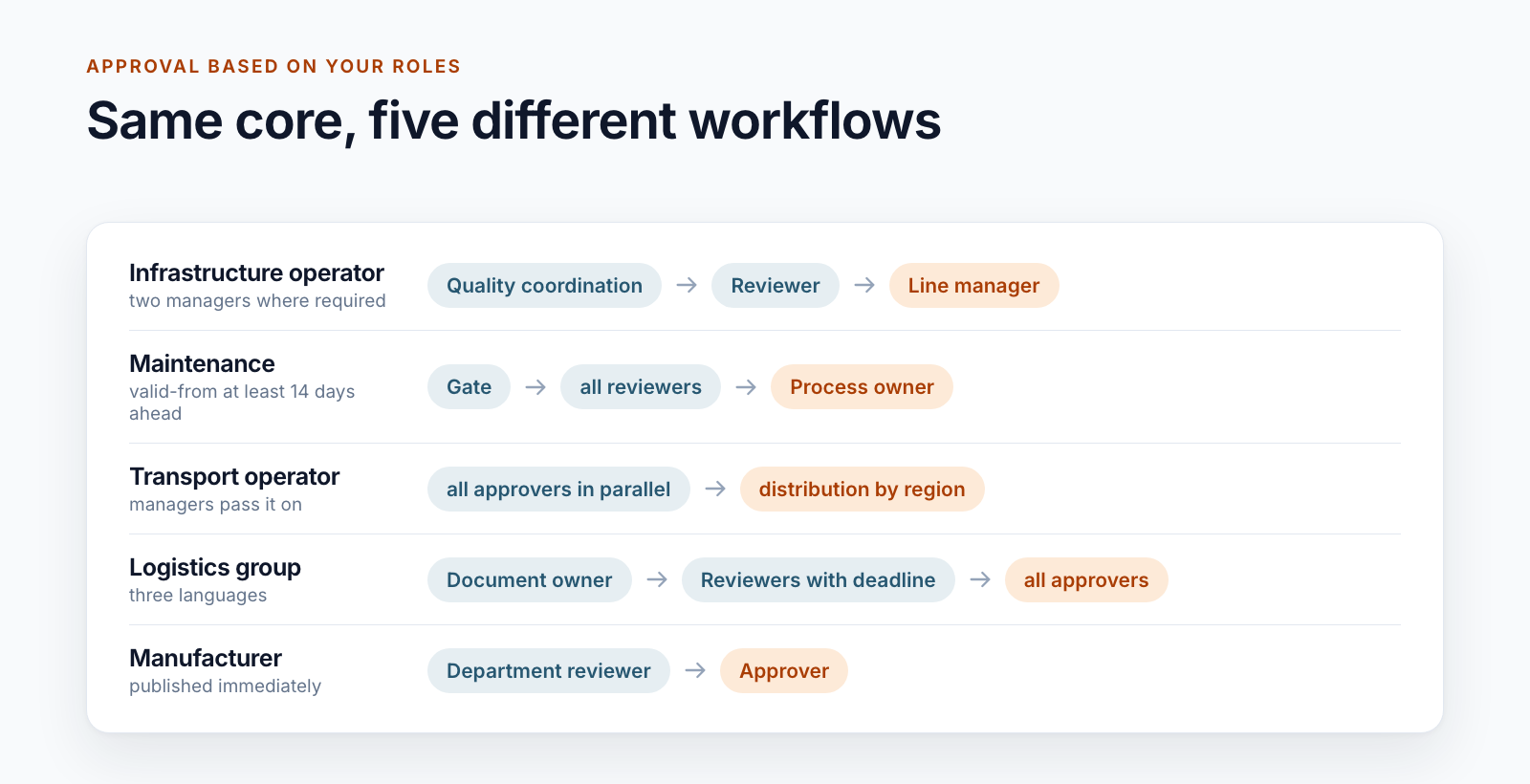
“Review, approve, publish” sounds like a workflow you build once and use everywhere. We have built it for very different organisations, and no two workflows are alike. The lifecycle of the documents is the same everywhere. The way through approval is not.
This post puts five examples side by side and derives from them the questions you should answer for your own approval workflow.
Five workflows compared
| Stages | Who decides | Special feature | |
|---|---|---|---|
| Infrastructure operator | quality coordination, reviewer, line manager | one person per stage, in some areas two line managers jointly | fast lane for formal changes |
| Maintenance | gate, reviewers, process owner | at the gate the first decision, in the review everyone | reviewers follow from the system relevance of the document |
| Transport operator | one stage | all approvers, in parallel | additional steps for safety-relevant documents |
| Logistics group | document owner, reviewers, approvers | all approvers | review with a deadline: anyone who stays silent does not hold up the workflow |
| Manufacturer | reviewers, approvers | the first decision per stage | approved documents apply immediately |
Behind each row is an organisation that has good reasons for its workflow. The differences give rise to eight questions.
1. Where do the people come from?
The obvious answer, a selection field at the start, is only one of four variants:
- Freely chosen: The editors select reviewers and approvers from a group.
- From the organisation: Line manager and quality coordination are stored for the responsible organisational unit. The system suggests them or sets them as fixed.
- From the content: If a document concerns certain management systems, the specialists responsible for them are added automatically as reviewers.
- From the process: The approver is always the owner of the process to which the document belongs.
The more that follows from master data, the less approval depends on someone knowing the right names. In return, the master data has to be correct. For one customer, it therefore comes from the HR system.
2. Is one decision enough or does everyone have to agree?
When five people receive a task, there are two readings. With “one for all”, the first decision closes the remaining tasks. With “all”, the workflow waits until every person has decided.
Both occur, sometimes in the same workflow: at the gate the first decision is enough, while in the subject-matter review everyone has to agree. One of the workflows also has joint approval by two line managers, which is switched on or off per organisational unit.
3. What happens on rejection?
The usual pattern: the workflow ends, the document goes back to editing and the editors receive the comment. A comment is usually mandatory on rejection.
One of the workflows handles the review differently. A “Not OK” from a reviewer stops nothing. The results of all reviewers go to the approvers, who decide with this knowledge. Only their rejection ends the workflow.
4. What happens if nobody responds?
Reminders before or after the deadline are standard. What is interesting is what comes after that:
- The task stays open until someone acts or an administrator reassigns it.
- The review ends automatically after a second deadline, and the workflow moves on to the approvers.
- The deadline is tied to the document: the line manager has to decide by the day before the valid-from date.
Escalation to superiors is not in use for approvals in any of the five workflows. It does exist for acknowledgements, where it goes to those responsible for the distribution list.
5. Is the document locked during approval?
In four of the five examples, yes. When the workflow starts, the editors lose write access, and the participants can read. After a rejection, write access returns. This ensures that what was reviewed is what gets approved.
6. Who may not be both?
Reviewers and approvers should be different people. One customer goes further and specifies that reviewers, approvers, document owners and editors are not on the acknowledgement distribution list at the same time. Such segregation-of-duties rules belong on the table early. Building them in afterwards is laborious.
7. Does every change need the full workflow?
A corrected typo or a new telephone number does not justify a three-stage approval. Two answers from practice:
- A fast lane for formal changes that only quality coordination approves. The version number shows the difference: 4a becomes 4b instead of 5a.
- A separate short workflow to extend the validity or change the person responsible without approving the content again.
8. Which special rules apply?
This is where the organisations differ most. Examples: a risk assessment by subject-matter experts before a safety-relevant document goes into approval. A reference number that has to be assigned before approval. A four-eyes principle for withdrawal.
These rules are the reason why a standard product rarely fits here. They are not special requests; they reflect what the organisation is liable for.
Why not Power Automate?
For an approval with one stage, Power Automate is a good choice. For the workflows above, we decided against it every time:
- The state of a workflow is stored in SharePoint lists, where authorised people can view and analyse it.
- Every step sets permissions on the document. That needs a service account with clearly limited rights, not a connection belonging to an individual person.
- The rules can be tested automatically before they go into operation.
The logic runs as a service in Azure Functions, the user interface in SharePoint. For users, it is a task in “My tasks” with the buttons “OK” and “Not OK”.
The Smarter DMS product page shows how approval works together with staging, acknowledgement and archive. For the valid-from date after approval, read the post Valid from: distributing documents before the effective date.
What does your approval workflow look like? Send us a sketch. We will tell you which of the eight questions are still open in your case.
All parts of the series:
- SharePoint as a DMS: where major and minor versions end
- Valid from: distributing documents before the effective date
- SharePoint document approval workflow: five real-world examples (this article)
- Read confirmation in SharePoint: proving acknowledgement
- ISO 9001 document control with SharePoint
- Building an integrated management system in Microsoft 365
- Controlled digital work instructions: from Word to the valid PDF
- Is SharePoint audit-proof? What a DMS must prove
- Smarter DMS
- Document control
- SharePoint Online
- Approval workflow
- Workflow