
Modern SharePoint page
Use it as a web part in a section of a modern SharePoint page, alongside other page content.

Microsoft Marketplace · Available now
Turn images into clear, interactive paths through your content.
Transform process landscapes, floor plans, organization charts and diagrams into responsive SharePoint navigation. Editors draw clickable areas in the browser and connect them to pages, documents or further maps.
Product video
See how a static diagram becomes interactive navigation with a dedicated editor, the right shape for every area, and visual drill-down.
English audio and captions
Duration: 1:07 minutes
Static process diagrams show relationships. But they do not guide people to the next step.
Smarter Image Map turns them into clear, interactive navigation directly in SharePoint. Precise areas explain their destination with meaningful tooltips.
Editors open a dedicated editing mode and draw areas directly on the image — without code and without editing the SharePoint page.
Rectangles, ellipses, and polygons fit every visual element. Advanced positioning stays out of the way until it is needed.
The real aha moment is visual drill-down: connect any process stage to a detailed child map in the same editor.
One click opens the subprocess without losing context. A visible breadcrumb guides users safely back to the overview.
The same web part runs on SharePoint pages, as a full-page app, and in Teams. Keyboard support and responsive areas are built in.
Smarter Image Map. Turn images into intuitive paths. Without code.
Included component and hosts
The solution package contains exactly one web part: Smarter Image Map. Its content and controls remain consistent in every supported host.
Use it as a web part in a section of a modern SharePoint page, alongside other page content.
Use it as a Single Part App Page when the image map should fill an entire modern SharePoint page.
Use it as a configurable tab in a Teams channel after syncing the app from the tenant App Catalog to Teams.
Not included: Smarter Image Map is not a Teams personal app and is not installed as a Teams Personal App.
The editor guides content owners through the entire setup. Percentage-based coordinates keep every area aligned when the image scales.
Use an existing file, organizational asset or OneDrive image, or upload a new one. Your content stays in your SharePoint site.
Create rectangles, ellipses and free-form polygons. Move and resize areas using a mouse or keyboard.
Connect an area to a SharePoint page, document, HTTPS address or another image map.
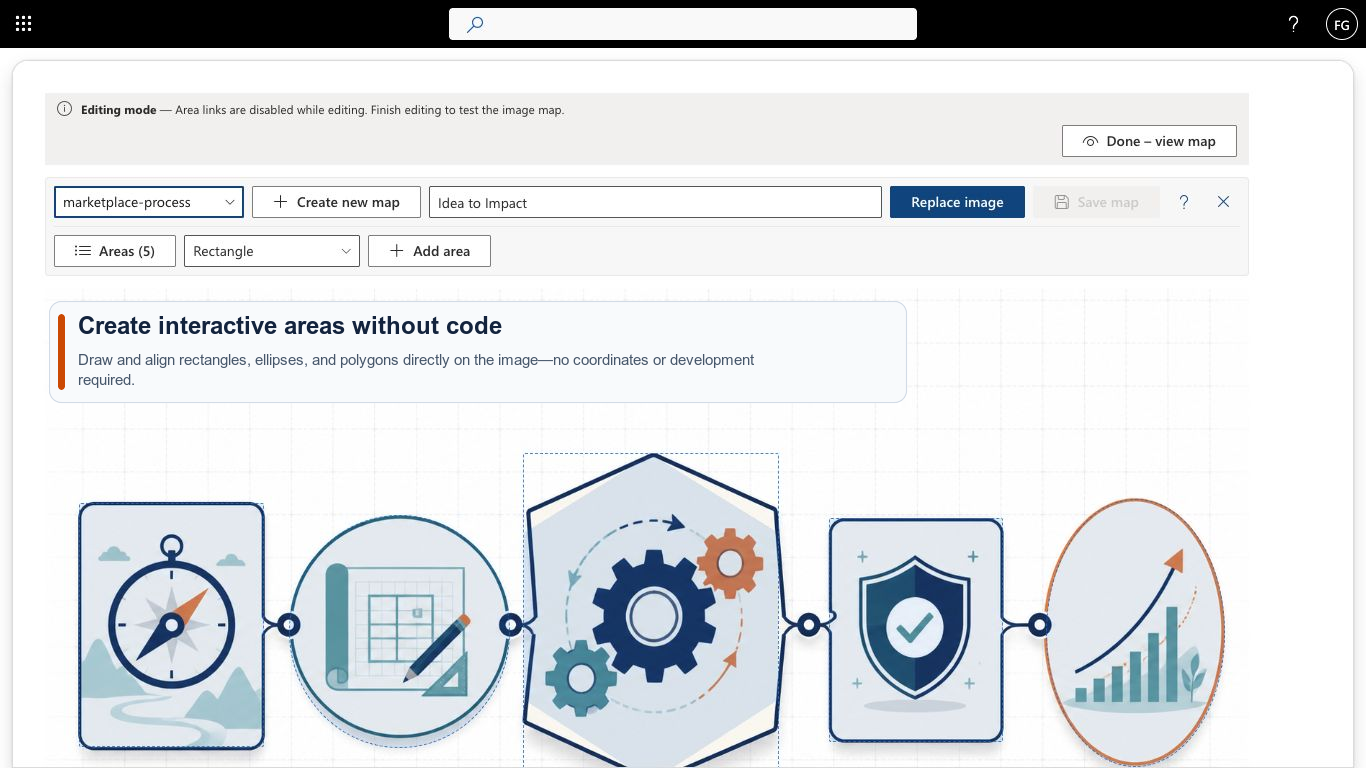
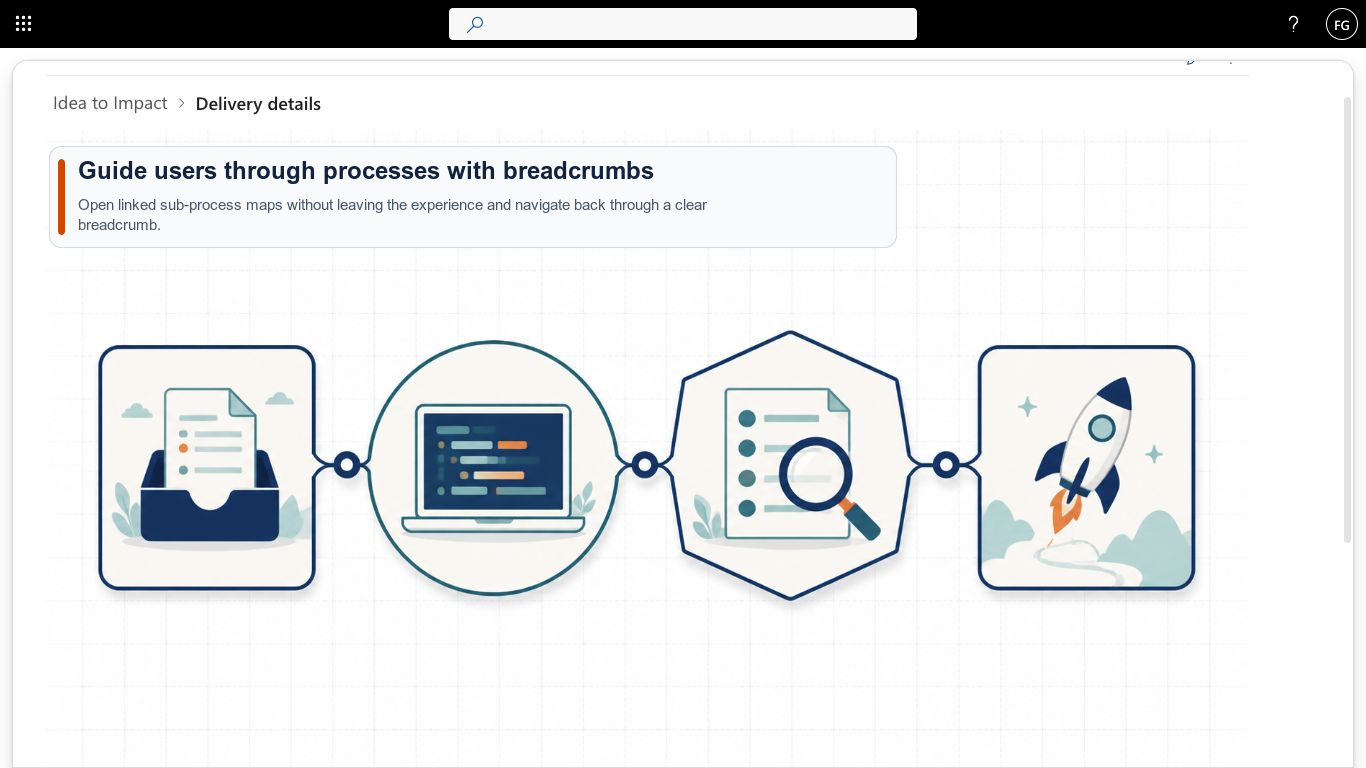
Nested maps let you present processes, locations or system landscapes across several levels. People move from overview to detail inside the web part and use the breadcrumb to return.
Rich tooltips explain each area on pointer hover or keyboard focus. A title and description provide context before the link opens.
Create detail maps when you need them. Existing links and areas remain unchanged.
Built-in tools or app?
SharePoint’s built-in tools display a single image well. Smarter Image Map becomes useful when the image itself needs to provide navigation.
If the left column covers your case, you don’t need an app – you’ve already paid for the built-in tools. Smarter Image Map exists for everything on the right.
Install the Microsoft-certified SharePoint app for free and purchase the right annual license directly from Microsoft.
Choose one site collection, five site collections or your entire tenant. Every plan includes all features; only the deployment scope changes.
The trial starts automatically when you first use the app.
No feature tiers and no artificial limits.
Purchasing & licensing
Microsoft separates the app from its license in the marketplace – that’s why you’ll find Smarter Image Map listed twice. Getting licensed is still quick:
Install Smarter Image Map from the Microsoft marketplace into your SharePoint environment for free and try every feature without obligation.
View the app in the marketplacePurchase the license as a subscription directly on Microsoft AppSource. You’ll see the price there in your local currency – including the correct taxes for your country.
See the price in your currencyAssign the license to the site collections where Smarter Image Map should run. Your data and settings from the trial are preserved.
Buying through AppSource is procurement without the procurement process: the contract runs through the Microsoft account your organization already has.
You buy from Microsoft – no vendor onboarding or supplier checks in your purchasing department.
With the correct VAT for your country, in your local currency.
The license appears on your existing Microsoft 365 invoice – alongside your other subscriptions.
Manage, scale or cancel the subscription at any time in the Microsoft 365 admin center.
Microsoft technically separates the app from its license: you install the app for free in your environment and purchase the license as a separate subscription. Microsoft mandates this split for all SharePoint apps with marketplace licensing. For the purchase, the listing with the “License” suffix is the right one.
Your data lives in your own SharePoint lists and is preserved. Once the license is activated, you continue right where you left off.
Not necessarily. Payment runs through your organization’s billing profile at Microsoft – by credit card or invoice, depending on your configuration.
The purchase is made in your organization’s Microsoft account – usually by someone with permission for marketplace purchases, for example a billing administrator.
Directly in the Microsoft 365 admin center – you manage the license like any other Microsoft subscription.
Questions about the purchase process?Get in touch – we’re happy to guide your IT team through the first purchase.
Images and map definitions live in the current site’s Site Assets library. Map content is never sent to the licensing service.
Semantic links and buttons, visible focus, Escape-dismissable tooltips and numeric alternatives to dragging support relevant WCAG 2.2 AA interaction patterns.
A dedicated editing mode separates page editing from map changes. The web part warns before closing with unsaved changes.
Guidance, privacy information and personal support for Smarter Image Map.
From installation to your first map, including drill-downs and keyboard controls.
View the guideWhat the app stores and what it transmits during a license check.
Read privacy policyTrial, license scope, Microsoft billing, data storage and support in one place.
Read termsWe answer questions about rollout, licensing and specific use cases.
Contact supportInstall the certified app from Microsoft Marketplace and create your first interactive map.