“Is that audit-proof?” The question comes up in almost every conversation about document management. The honest answer begins with a question in return: what exactly is to be proven, and to whom?
Behind the word “audit-proof” (German: revisionssicher) lie two different concerns that are often conflated. This post separates them, shows what SharePoint and Microsoft Purview each deliver, and describes what a DMS for controlled documents should prove beyond that. It is not legal advice. Which obligations apply to your organisation is something to clarify with your tax adviser, legal department or auditor.
Two concerns behind one word
Retention of accounting records. Invoices, contracts and bookkeeping documents must be retained unchanged, complete and retrievable for statutory periods. This is the context the term comes from. In Germany it is mostly associated with the GoBD (the German principles for proper electronic bookkeeping), in Austria with the retention obligations of the Austrian Federal Fiscal Code (Bundesabgabenordnung). Typical criteria are immutability, completeness, protection against loss, access only for authorised persons, compliance with the retention periods and a documented procedure.
Control of governing documents. Work instructions, policies and procedures change all the time. Here the question is not whether a document has remained unchanged. It is: which version was valid on a given day, who approved it, and who knew it?
An archive for incoming invoices and a system for work instructions solve different problems. Anyone who calls both a “DMS” and applies the same yardstick gets a good answer for neither.
What SharePoint delivers out of the box
Version history. Every change creates a version with the person and the time. But the history is not a vault. The number of versions kept is limited, and anyone with sufficient permissions can delete versions.
Permissions. Anyone who is only allowed to read cannot change anything. Site owners and administrators can. That is part of any honest assessment.
Recycle bin. Deleted files can be restored for 93 days. After that they are gone, unless retention applies.
Audit log. Audit in Microsoft Purview records access and changes. How long the entries are retained depends on the licence and is limited to months as standard.
Taken on its own, this does not make SharePoint audit-proof. It is the foundation that can be built on.
What Microsoft Purview adds
For the first concern, retention, Purview is the right tool:
- Retention labels define the minimum length of time a document is preserved, even if users delete it.
- Labelling a document as a record locks it against changes.
- Retention policies apply to entire sites or libraries.
Whether these means are sufficient for your tax-related or industry-specific obligations also depends on organisation and procedural documentation. Many companies therefore additionally hand over documents that are subject to retention obligations to a dedicated archive system.
What a DMS for controlled documents must prove
For the second concern, retention is not enough. What is needed is traceability of the workflow. Six questions that a system should answer:
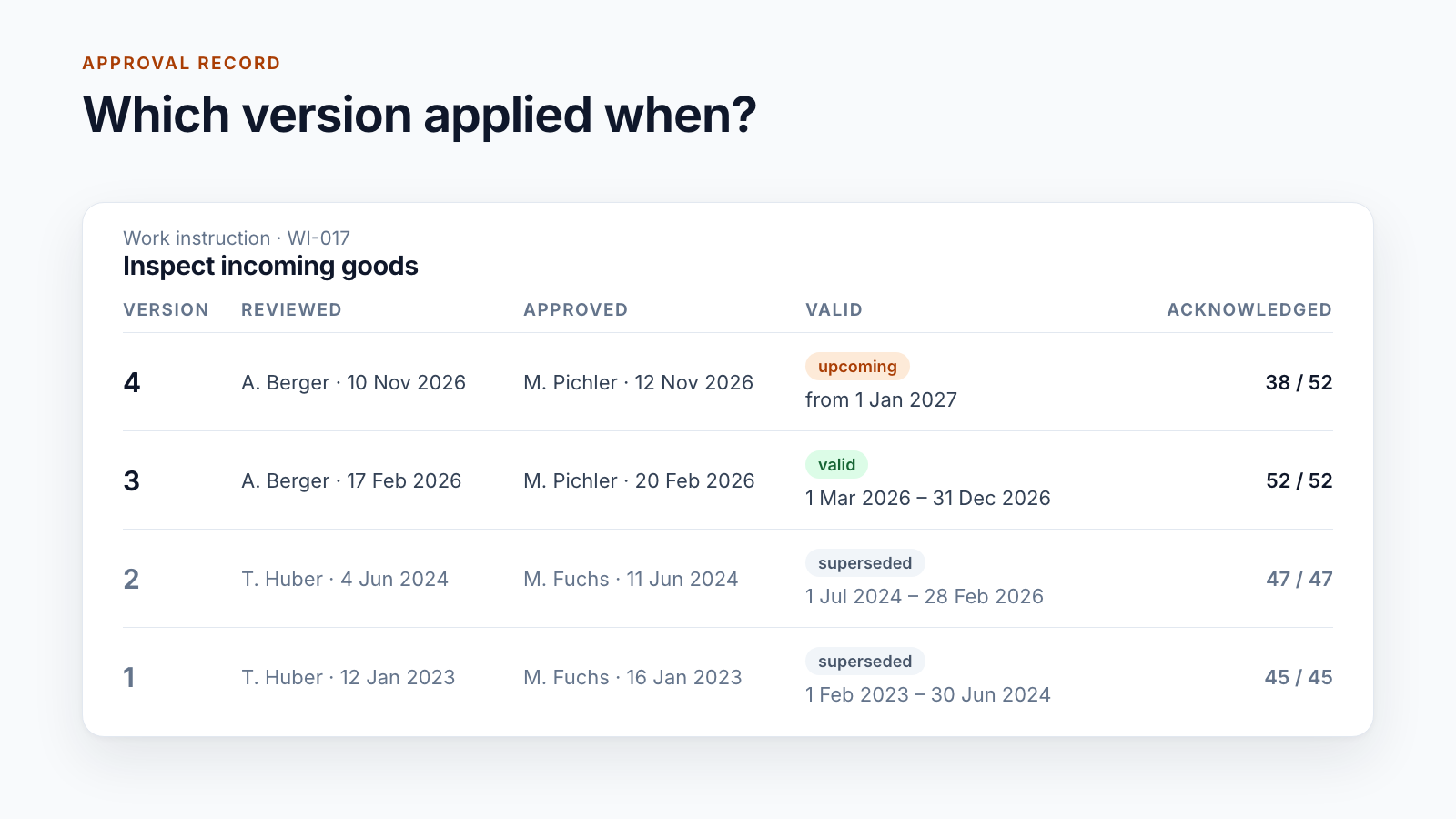
1. Which version was valid when? For each version, a period from “valid from” until it is superseded. This presupposes that approval and entry into force are recorded separately.
2. Who reviewed and approved? Not who uploaded the file. An approval record names, for each version, the people, their decision, the date and their comment.
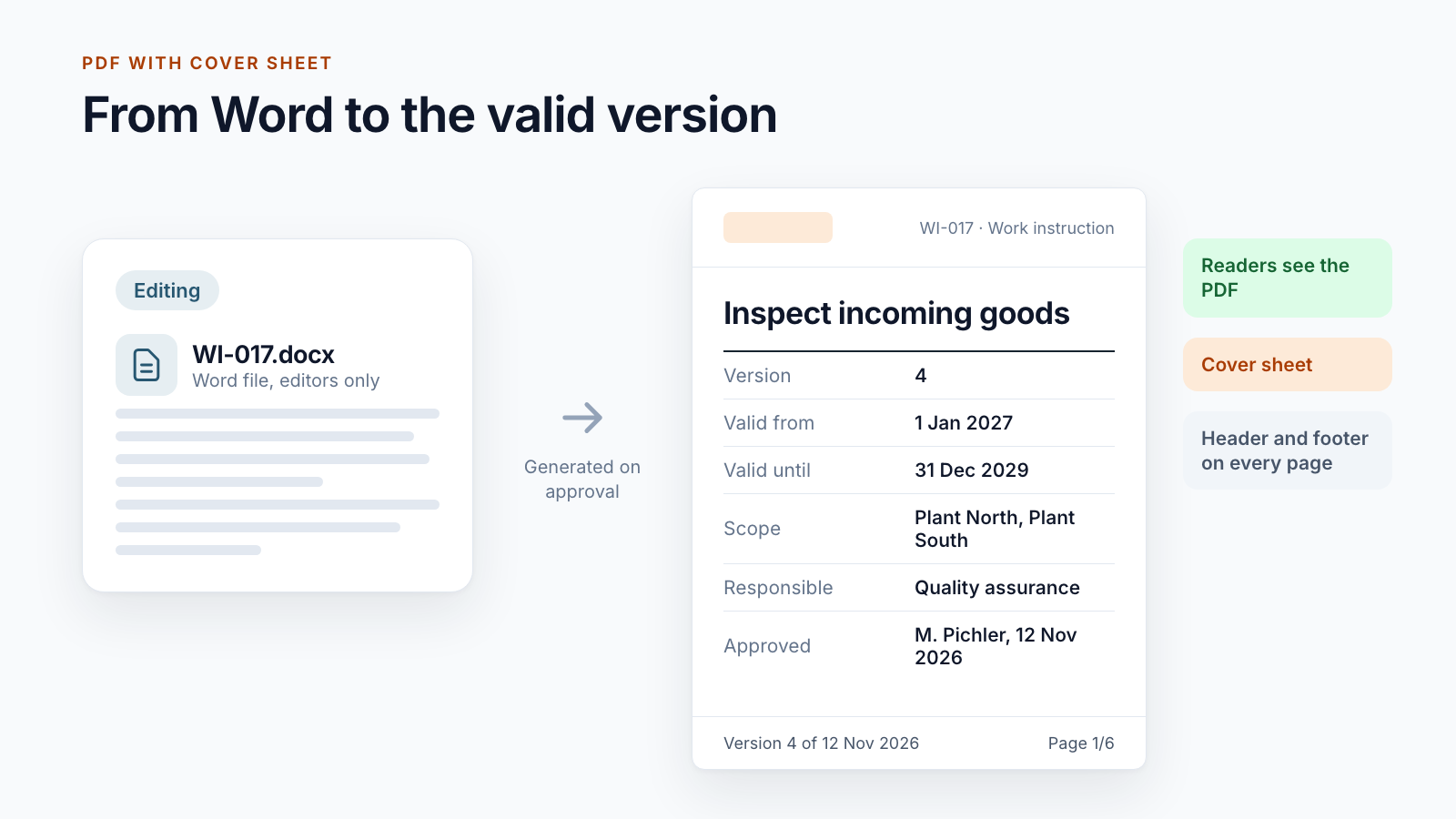
3. Could the valid version have been changed afterwards? In our projects, editing and valid documents are kept in separate libraries. As a rule, only the service that carries out the approval writes to the valid documents. Editors and readers have read permissions there. For some customers, the reader version is a PDF that is generated on approval.
4. Who knew the version? Acknowledgements per person and version, with date. On this, see the post Read confirmation in SharePoint.
5. What happened to superseded and withdrawn documents? Superseded versions remain in the version history of the valid document; withdrawn documents go to the archive. For most customers, a withdrawal has a justification and its own approval.
6. Can all of this be produced? A version history as a PDF, a workflow history per document, an export of the acknowledgements. In an audit, what counts is what is on the table within five minutes.
Where the limits lie
We do not describe Smarter DMS as audit-proof across the board, and there are reasons for that:
- The solution stores its data in SharePoint. Immutability in the strict sense additionally requires retention or record labelling in Purview, or an archive system.
- Version limits and administrator rights also apply to the libraries of a DMS. They should be deliberately configured and documented.
- Audit-proof storage always includes organisation as well: who has which rights, how changes to the system itself are approved, how the procedure is documented.
For one of our customers, every published version is therefore additionally handed over to the group’s archive system, with metadata, approver, workflow history and retention period. The DMS controls, the archive retains. How this handover is built is described in the post Connecting SharePoint and LiveLink.
Questions to ask of your system
You can use this list to check any system, including a pure SharePoint solution:
- Can I show, for any day in recent years, which version was valid?
- Does every version state who reviewed and who approved it?
- Who, apart from administrators, can change or delete a valid version?
- How many versions are kept, and who decided that?
- Does retention apply to the library, and for how long?
- What happens to a document that is withdrawn?
- How long does it take to produce the evidence for a document?
Conclusion
SharePoint is not audit-proof simply because someone calls it that. For accounting records, you achieve retention with Purview or an archive system. For controlled documents, what counts is traceability: which version, approved by whom, valid from when, confirmed by whom. The one does not replace the other.
Do you have to prove to auditors or a supervisory authority what was valid when? Let’s talk about what your current system can answer and what it cannot.
All parts of the series:
- SharePoint as a DMS: where major and minor versions end
- Valid from: distributing documents before the effective date
- SharePoint document approval workflow: five real-world examples
- Read confirmation in SharePoint: proving acknowledgement
- ISO 9001 document control with SharePoint
- Building an integrated management system in Microsoft 365
- Controlled digital work instructions: from Word to the valid PDF
- Is SharePoint audit-proof? What a DMS must prove (this article)
- Smarter DMS
- Document control
- SharePoint Online
- Audit-proof storage
- Microsoft Purview