A safety induction on a construction site should fit the project. Is there work at height? During the client’s ongoing operations? Hot work? The documents for all of this are in the management system for health, safety and environment (HSE). What often reaches the site is a folder with everything, plus a signature list on paper.
In one of our projects, for a customer in plant engineering, this became the HSE configurator (in German: SGU-Konfigurator): an application in the SharePoint project workspace that compiles the right documents from a question catalogue and records the acknowledgement of everyone involved with a signature. All screenshots show the application with an invented demo catalogue. The interface is German.
The record of instruction: duty and practice
Employers must instruct their employees, and they must be able to prove it. In Austria this is laid down in section 14 of the Workers’ Protection Act (ASchG). On sites with several companies, the site rules and the requirements of the site coordination come on top. In practice we see three weak points:
- Too much paper: people who receive every document read none. What applies to this site gets lost.
- Unclear version: which version did the fitter sign who started three weeks ago?
- Proof on slips of paper: the signature list is in the site container and cannot be found when it matters.
Step 1: what applies to this site?
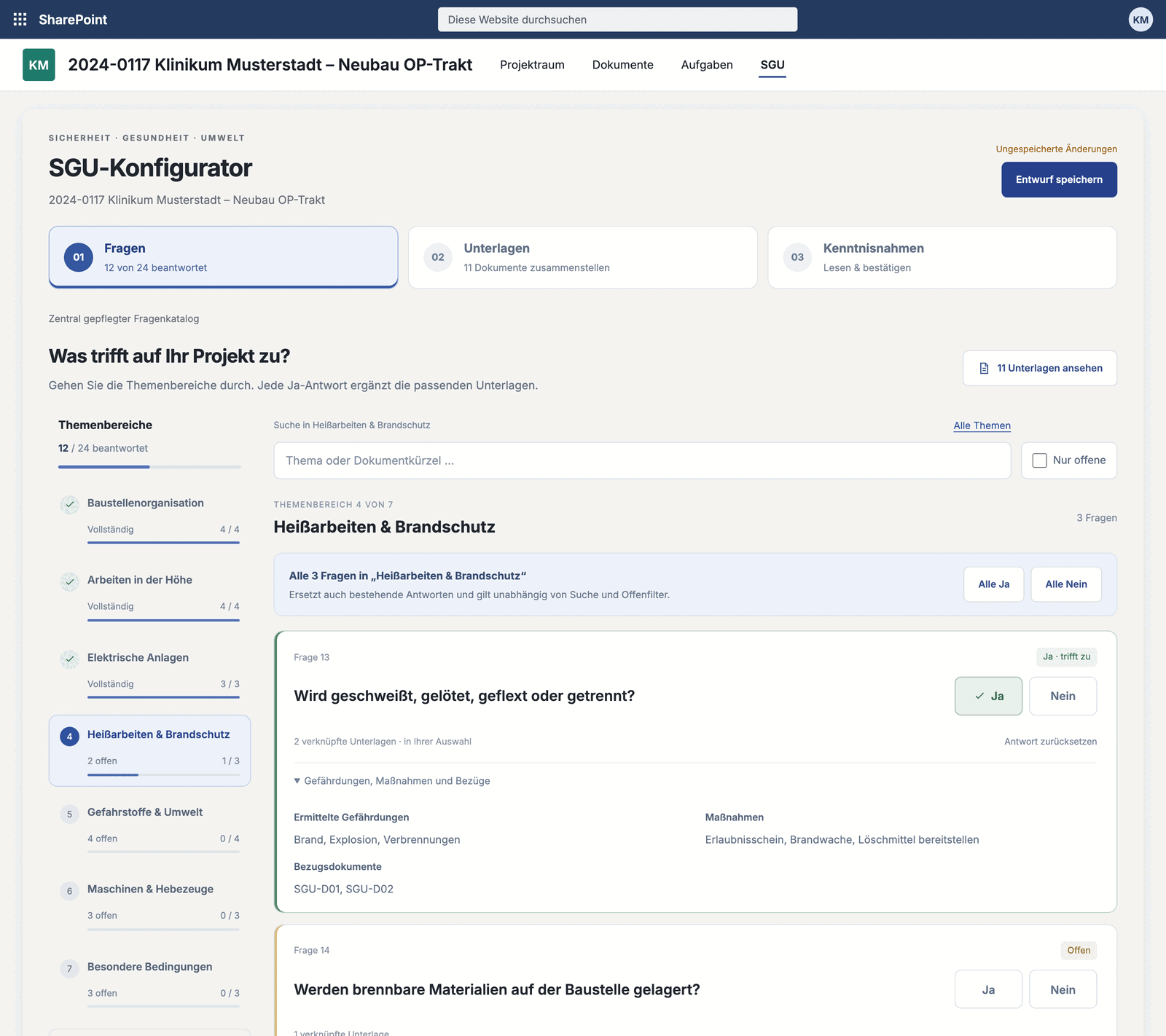
The project manager answers a question catalogue with yes or no, grouped by topic area. The catalogue is maintained by the team that is also responsible for the management system. Behind every question are the hazards, the measures and the documents that belong to a yes.
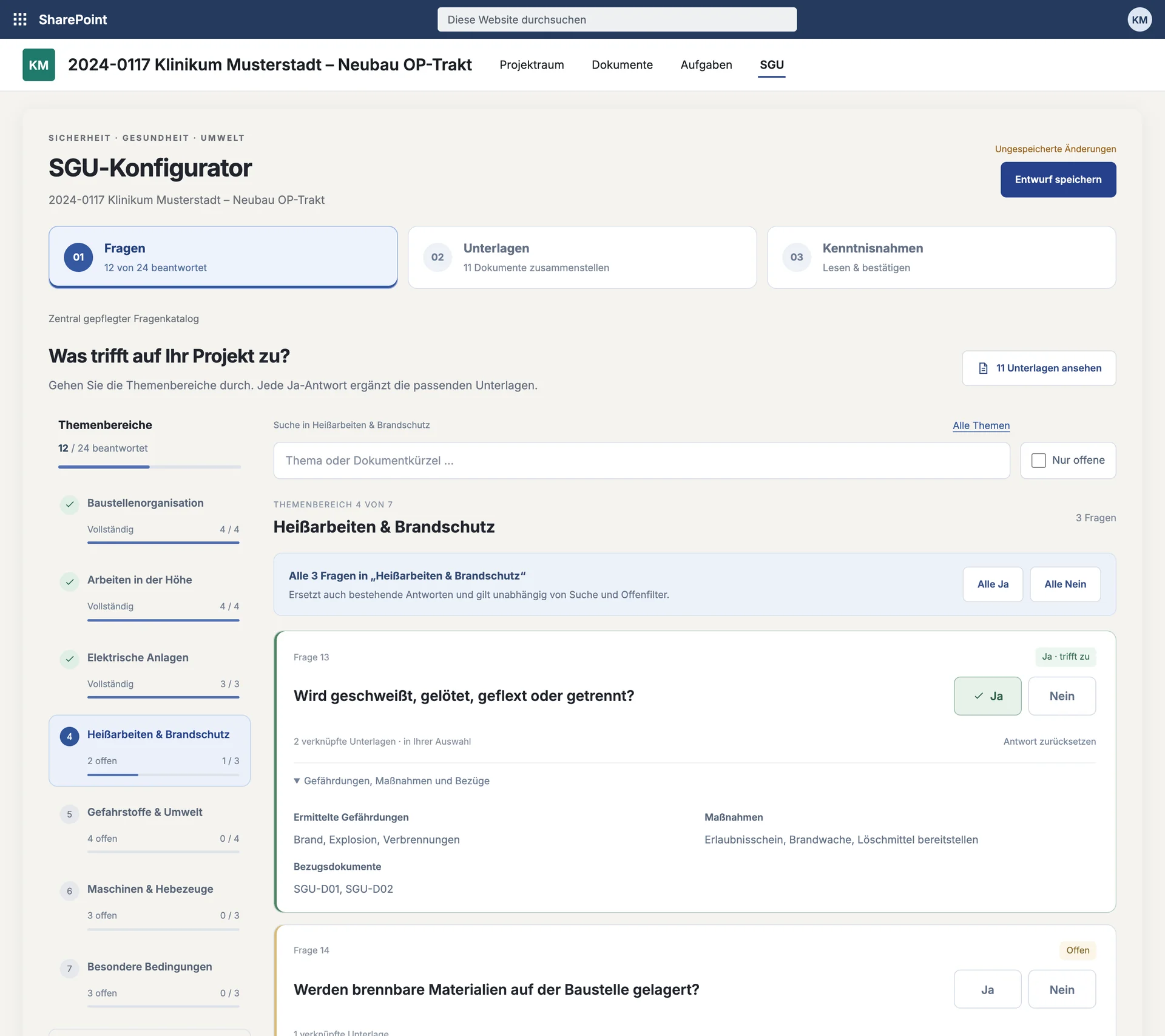
One click per question. Topic areas that do not apply can be answered in one go.
The draft is saved in the project workspace. You can stop and continue later.
Step 2: site-specific documents instead of a folder with everything
The answers determine the selection of documents. Each one appears exactly once, even if several questions refer to it. Each one states why it is included.
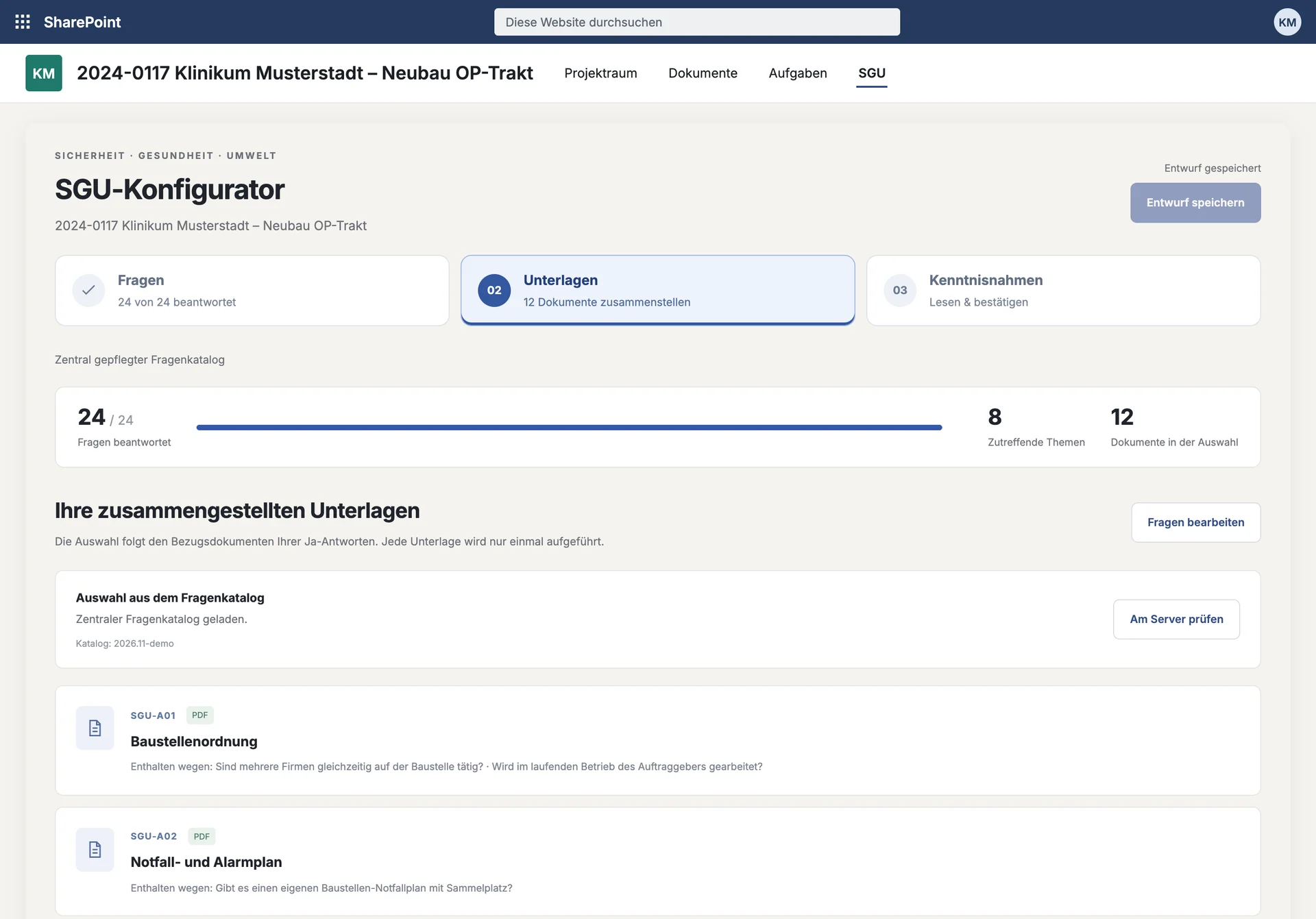
Here 24 answers lead to 12 documents. The others do not apply to this site.
One click turns them into a single PDF: cover page with the project data, table of contents, then the documents in their current version from the management system. The PDF is stored as a fixed version in the project workspace. Later changes to the answers do not alter that version. They lead to a new one.
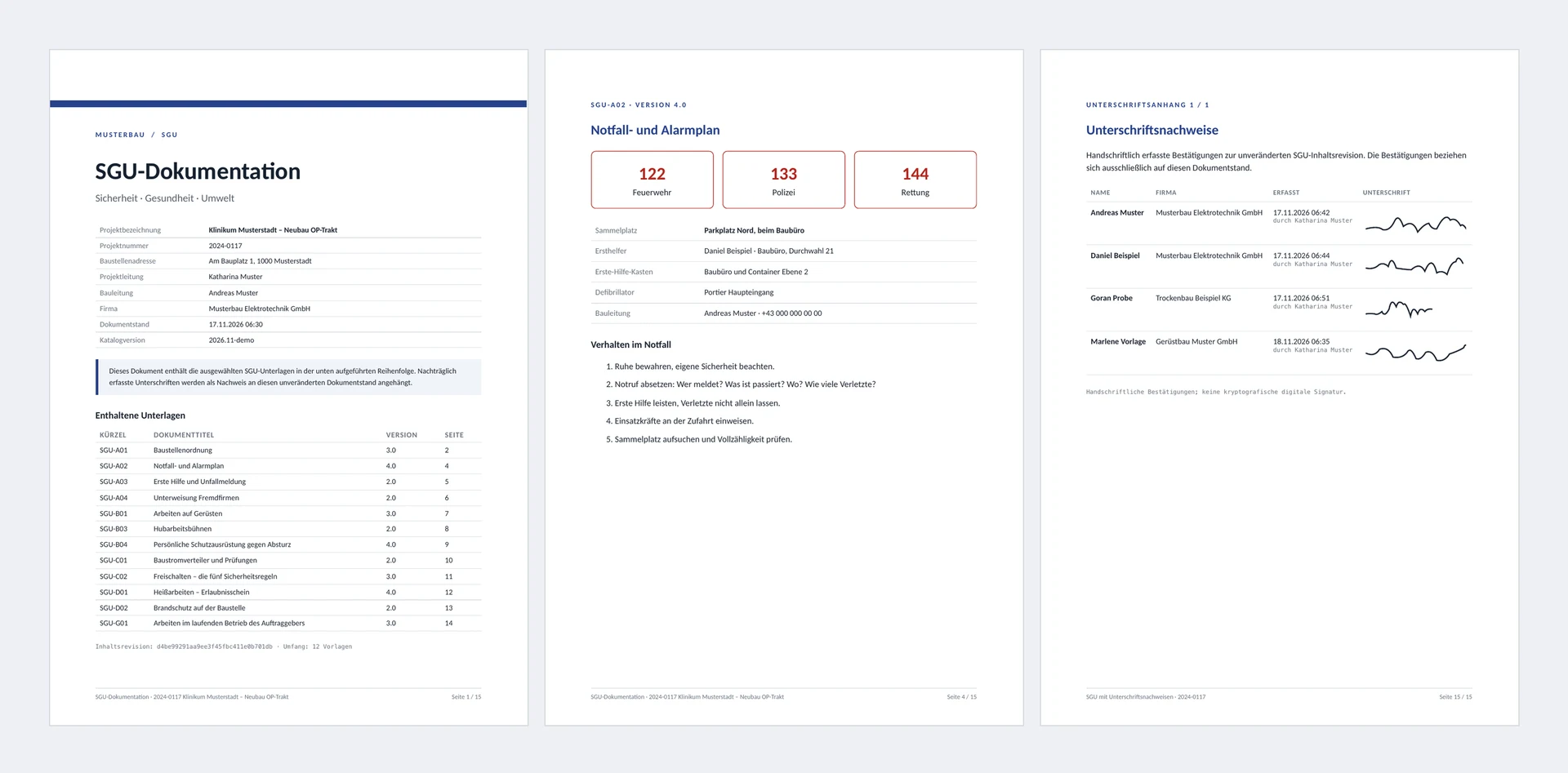
Cover page, one of the included documents and the appendix with the signature records.
Step 3: induction with a signature on the tablet
At the induction, the site manager opens the version on a tablet or laptop. The document is on the left to go through. On the right, those present enter their details: name, company, signature with pen or finger and the explicit confirmation that they have taken note of the documents.
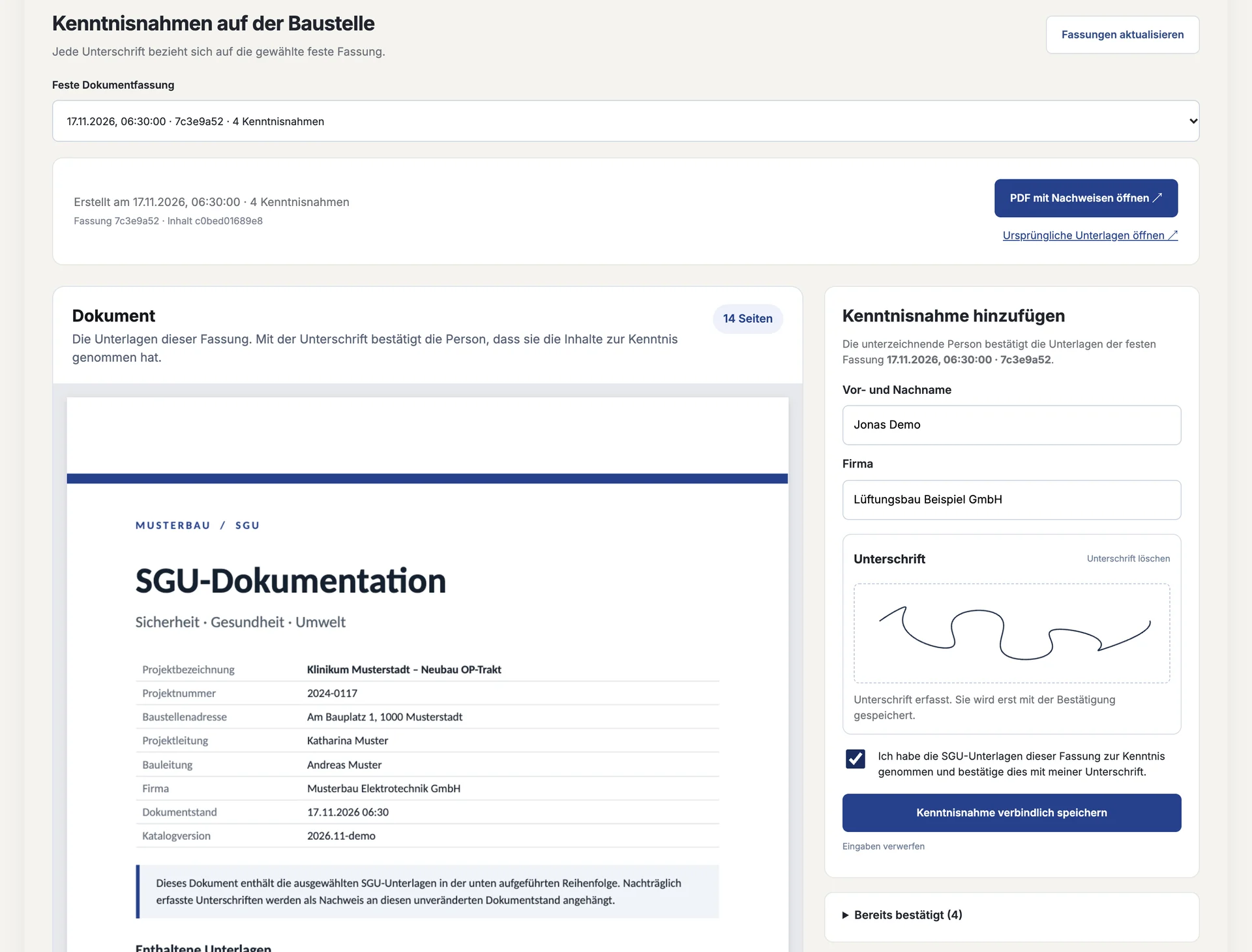
The digital signature list: every acknowledgement belongs to exactly one version of the document.
Inducting contractors and subcontractors
Own staff, subcontractors and agency workers confirm the same version. Anyone who joins the site later signs afterwards. Every signature is appended to the PDF as a record with its timestamp:
- If the project changes, for example because welding turns out to be necessary, a new version is created with the additional documents.
- The existing acknowledgements stay with the old version. Nobody has retroactively signed something they never saw.
- The project workspace always holds a PDF with the documents and the signed records that can be shown to the client or the authority.
What is secured in the background
- No duplicate operation: if the connection drops while saving, the same operation is resumed. No duplicate versions or signatures are created.
- Unchanged version: before every acknowledgement the application checks that the PDF shown matches the stored version.
- Rights as in the project workspace: sign-in and permissions come from Microsoft 365. Anyone who has no business in the project does not see the documents either.
- Central catalogue: if the specialist department changes a question or a document, this applies to all new versions. Existing ones stay as they were signed.
Technically the solution consists of an SPFx web part in the project workspace and an Azure Function that assembles the combined document and appends the records. Catalogue, drafts and PDFs are stored in SharePoint in your own tenant.
What remains open
The signature is a handwritten confirmation on the screen, not a qualified electronic signature. Whether that is sufficient for your record of instruction is something to clarify with your safety officer or your legal counsel. Where a qualified signature is required, for example with ID Austria, we already run a solution in another project that signs directly from the SharePoint library, one document at a time or in batches. The article Signing documents in SharePoint shows how it works.
The configurator does not create a health and safety plan and does not replace the site rules. It compiles your own documents to fit the site and proves that they were acknowledged. It needs a connection to save.
It does not come with content. Questions, hazards, measures and documents come from your own management system. What is needed: a question catalogue as a list with the codes of the documents, the documents themselves as PDFs in SharePoint, and project workspaces in which the application runs. The HSE configurator is an extension to Smarter Project Portal. The same pattern fits contractor inductions in a plant or training on equipment. For acknowledgements in the intranet there is a separate article.
Still inducting with a folder and a signature list? Describe your process to us. We will assess how much of it can be covered.
All parts of the series:
- Provisioning SharePoint project workspaces automatically: where templates end
- Folder structure for projects in SharePoint: template, not copy
- Teams template with Planner: project teams with standard tasks
- SharePoint permission concept for projects: roles, not names
- Project data from ERP and SAP in SharePoint: four patterns
- SharePoint OCR: making scanned PDFs searchable
- Drawing management in SharePoint: drawing code, index and versions
- Project phases in SharePoint: from quotation to project closure
- Managing SharePoint permissions in Excel: the permission matrix of a project workspace
- Reference list and reference sheet for construction projects: maintaining reference projects in SharePoint
- Digital safety induction on the construction site: site-specific, with a signed record (this article)