
SharePoint Solutions & Products
Corporate Health Management with Microsoft 365
Run corporate health screenings in Microsoft 365 with Smarter Event Booking: manage sign-ups, time slots, waitlists, and confirmations.
Read moreBlog
Practical articles on SharePoint, Microsoft 365, Teams and SPFx – based on more than 20 years of project experience. Page 7.
Run corporate health screenings in Microsoft 365 with Smarter Event Booking: manage sign-ups, time slots, waitlists, and confirmations.
Read moreHow we built the waitlist in Smarter Event Booking: automatic promotion when seats free up, email notifications, and simple management directly in SharePoint.
Read moreWe built an SPFx web part for SharePoint event bookings. Employees can browse sessions, register, manage waitlists, and download materials.
Read moreNew worksheet in our Excel add‑in to manage SharePoint users and groups, review unique permissions, and transfer roles efficiently.
Read moreSmarter Business Solutions is nominated for the 2021 Constantinus Award with TagTeam, its Teams app, in the Standard Software & Cloud Services category.
Read more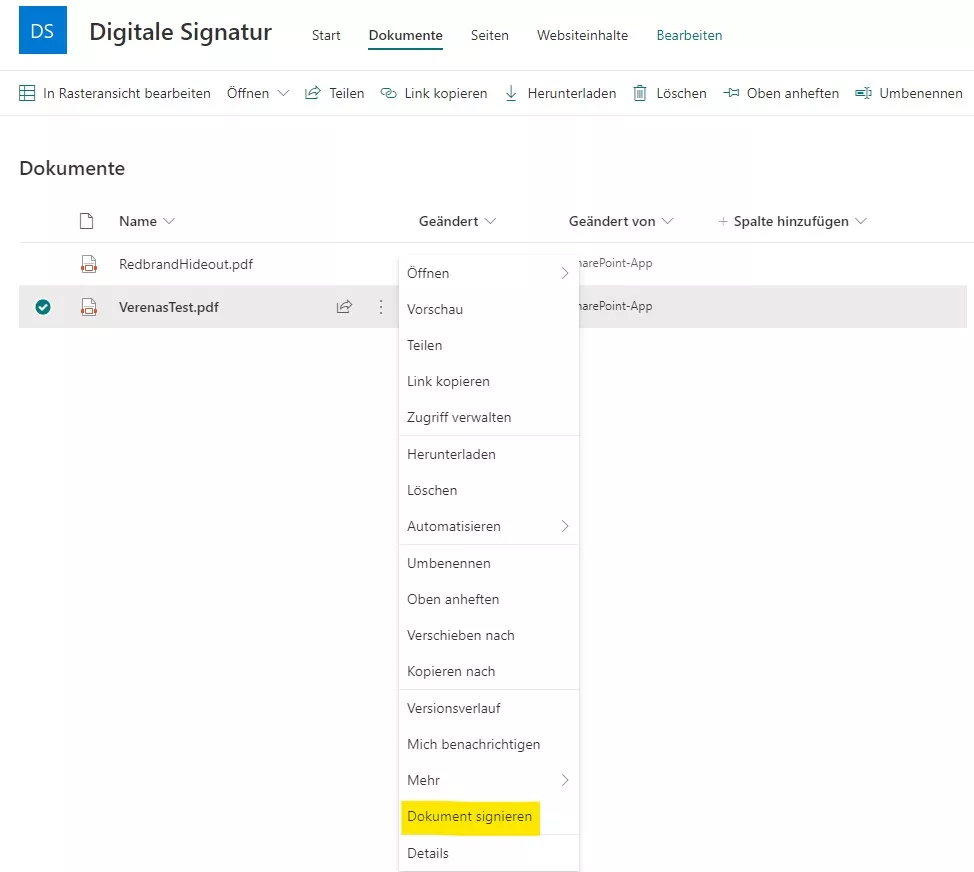
How we adapted our digital signature solution for SharePoint Online: core architecture, SSOM/CSOM, dependency injection with Ninject, and a provider-hosted add-in.
Read moreLearn how to precisely place a digital signature in SharePoint PDFs: capture canvas click coordinates, compute positions, and integrate with A‑Trust.
Read moreSee how our SharePoint workflow collects digital signatures: assign signers, set positions, notify by email, and download the signed PDF.
Read moreDiscover our Word add-in: insert SharePoint list data as reusable text blocks via HTML templates with one click — for consistent documents and less effort.
Read morePage 7 of 14
We are happy to help with implementation – from a quick assessment to a complete project.