In many companies, the most important question is not: Who works here? That information usually exists somewhere in the address book or SharePoint intranet phone directory. The harder question is: Who actually knows this topic? That is the gap a SharePoint people search with a skills feature closes.
We extended an existing SharePoint phone directory into skills search in SharePoint. Employees can search not only by name, location, or phone number, but also by competencies, software, standards, and specialist topics. The solution runs directly in SharePoint and uses existing Microsoft 365 data instead of creating a second shadow directory.
We have written about a related but different requirement before: The development of a SharePoint phone directory web part was not about skills or open people search. It was an SPFx web part that automatically displayed and sorted users from Azure AD and security groups. This article addresses a different layer: search across profiles, contact details, and skills in the intranet.
The address book is not enough
A classic phone directory answers simple questions well: What is the email address? Where does the person work? Which phone number is maintained?
Project organizations usually need more specific answers:
- Who knows a particular planning tool?
- Who has experience with a technical standard?
- Who can help with a specific planning or installation topic?
- Which people at which location fit a task?
This knowledge often lives only in people’s heads, chat histories, or spreadsheets. That makes expertise dependent on personal networks. New colleagues, or people searching outside their own department, struggle to find the right contact.
Microsoft 365 skills where people already search
We implemented the SPFx people search as a full-page app. The search deliberately runs in SharePoint because users already work there. There is no extra platform, no separate login, and no context switch.
The skills feature adds structured competency areas to each profile. In this setup, categories include specialist knowledge, software, and Centers of Competence. The Microsoft 365 skills come from a centrally maintained skills catalog. This keeps naming consistent and produces better search results than uncontrolled free text.
The maintenance flow had to stay simple. Users can edit their own skills. Administrators can maintain the catalog and correct other profiles when needed. Authorization is handled through a defined SharePoint group.
Microsoft 365 profile instead of duplicate data
The key architecture decision was not to duplicate skills in a separate people list. We store selected skills in the Microsoft 365 user profile, using a searchable profile property.
This has several advantages:
- The data belongs to the real user profile.
- SharePoint Search can find people and skills together.
- There is no second user directory with its own synchronization logic.
- Existing profile data such as name, location, phone, and email remains the leading source.
The technical setup combines three building blocks:
- SPFx frontend for search, result cards, profile editing, and catalog administration.
- SharePoint Search for fast people results including skill text.
- Azure Function / Datahub for server-side profile and catalog operations, such as writing profile values and migrating catalog changes.
We also use Microsoft Graph where the SharePoint search index does not reliably return every required profile field. That typically affects detail or overview views with fields such as company, email address, cost center, or mobile number. These Microsoft Graph user profiles enrich the search data selectively: the search stays fast, while missing profile information is loaded on demand.
The skills catalog prevents free-text drift
A free-text field would be quick to build, but hard to run over time. Users would enter variants such as “PV system”, “PV systems”, “photovoltaics”, and “solar”. People understand the relationship, but search, reporting, and export become unnecessarily weak.
That is why the solution uses a central catalog. Administrators can add, rename, or deactivate skill values per category. When a value is renamed, the Datahub function migrates existing profiles. When a value should no longer be used, it is deactivated semantically instead of being hard-deleted from history.
That detail matters in operations. The catalog stays clean, search remains reliable, and the organization can evolve the model step by step.
Result cards must be immediately useful
A good people search cannot stop at names. The next action must be available immediately.
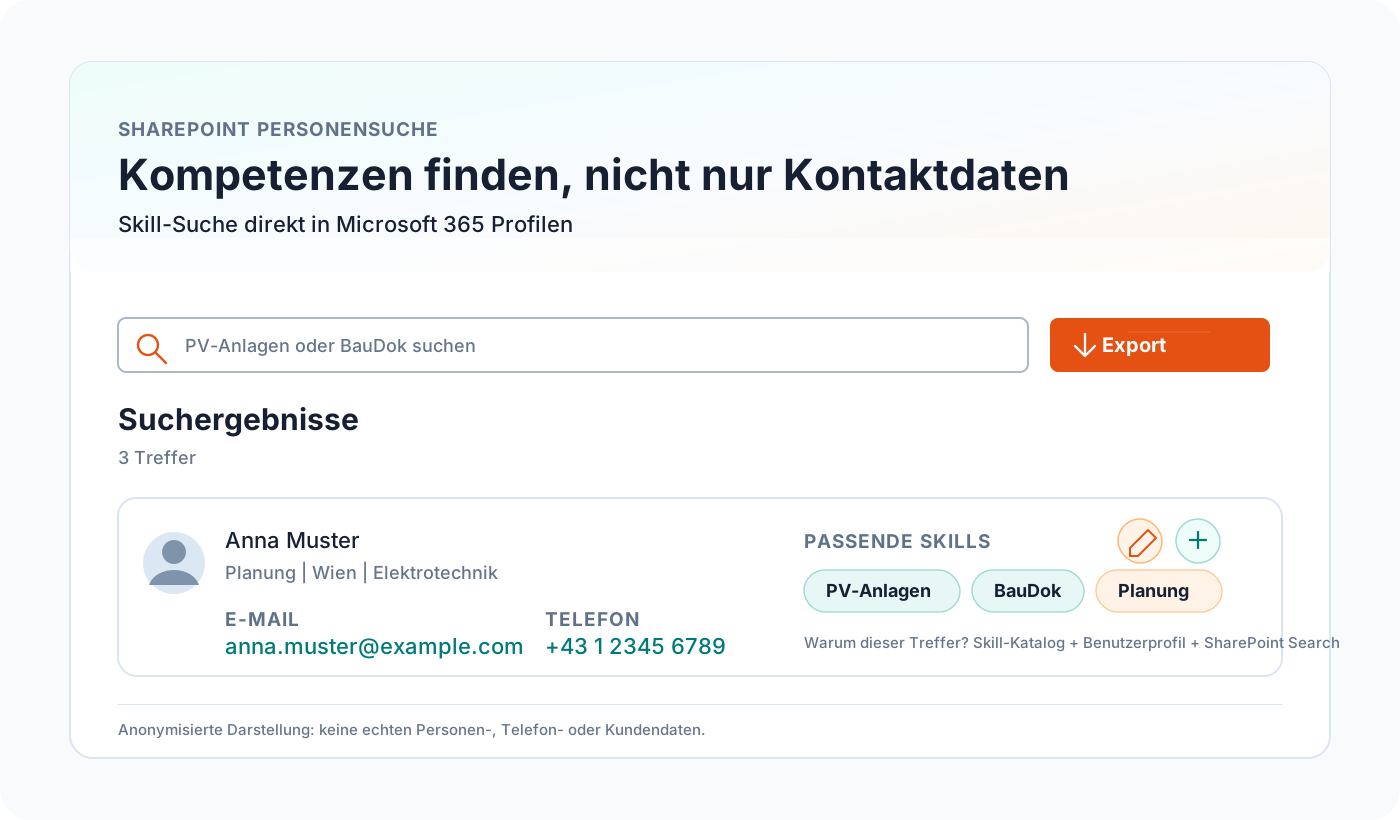
The result cards therefore show the most important contact information in a compact layout: email with a mail link, business phone, mobile number with a phone link for smartphones, address, location, company, role, and cost center. If an address is available, users can open it directly as a map link.
Skills are not shown as detached metadata. They are embedded in the search context. When someone searches for a term, they see not only the matching person but also why that person matched. That reduces follow-up questions and makes results understandable.
Overview for maintenance and analysis
In addition to the normal search, the solution includes an overview. It helps administrators and subject owners review profile and skill data. They can filter people, inspect skill columns, and export the complete search result.
That matters because skills management is not finished after the first rollout. After launch, teams usually discover missing categories, values that are too broad, and profiles that still need maintenance. An exportable overview makes this work much easier.
Business value: knowledge becomes findable
The main benefit is not technical. It shows up in daily work:
- New colleagues find the right contacts faster.
- Project teams search more directly for experience and specialist knowledge.
- Locations and companies become better connected.
- Skills become visible without introducing another platform.
- Profile maintenance stays close to the user profile and therefore closer to reality.
In larger organizations, this is a real lever. Expertise often exists but is hard to see. A strong people search makes that knowledge accessible without adding process overhead.
Why SharePoint is a good fit
SharePoint is not just a document repository. In many organizations, it is the workspace where project information, intranet pages, and internal tools come together. A people search belongs exactly there.
SPFx integrates the interface cleanly into SharePoint. SharePoint Search delivers fast results from existing Microsoft 365 profiles. Microsoft Graph and Azure Functions close the gaps that the standard platform leaves open. This combination is pragmatic: it uses the Microsoft 365 stack where it is strong and extends it only where business requirements need more.
Conclusion
The skills feature turns people search into an internal knowledge tool. It answers not only how to reach someone, but also why that person may be relevant for a topic.
That is the value for us: no new island, no duplicate data maintenance, no spreadsheet with an expiry date. Instead, the solution connects SharePoint-native search, Microsoft 365 profiles, structured skills, and fast discovery.
If you have a similar requirement, such as a SharePoint intranet phone directory, internal people search, or skills search for your intranet, get in touch with us. The solution is intentionally lightweight, quick to customize for your profile fields, permissions, and search logic, and can be deployed in an existing SharePoint environment without a long product development cycle.