We have already introduced our guest registration app in earlier posts. It lets you check visitors in and out directly in Outlook, providing full visibility into who was onsite and when—crucial transparency during the pandemic. This article showcases our latest enhancement: guests now scan their 3G proof as part of the check-in.
Enhanced guest registration with 3G proof
Check-in with a built-in scan
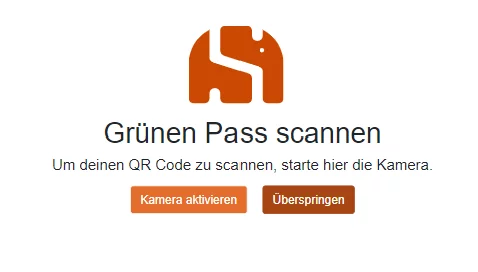
When a visitor arrives, they register at reception. With the new feature, they scan their 3G certificate right inside the registration flow. As soon as the QR code is validated, the system stores the result with the guest’s Outlook entry.

Optional step when needed
The automated scan removes the need for manual spot checks. Organizations decide whether uploading proof is mandatory or optional. If it is optional, guests can skip the final screen and are still checked into Outlook without a 3G certificate.
Flexible after the pandemic
Once COVID restrictions are lifted, you can disable the 3G proof step entirely so guests check in as usual without providing an additional certificate.
3G at the workplace
Smarter 3G supports employees
To comply with 3G policies in Austria and Germany, we also built Smarter 3G. It records and monitors employee certificates, allowing staff to register their proof themselves and sparing supervisors from manual checks. The discontinued portal was available via sicher-am-arbeitsplatz.at for Austrian companies and sicher-zur-arbeit.de for German organizations.
- Smarter 3G
- Smarter Visitor Registration