In this post, we’re excited to introduce our new application for SharePoint event bookings: Smarter Event Booking. We built it as an SPFx web part. Employees can browse upcoming sessions, register, and manage their bookings. Below, we walk you through the structure of the app.
Application Structure
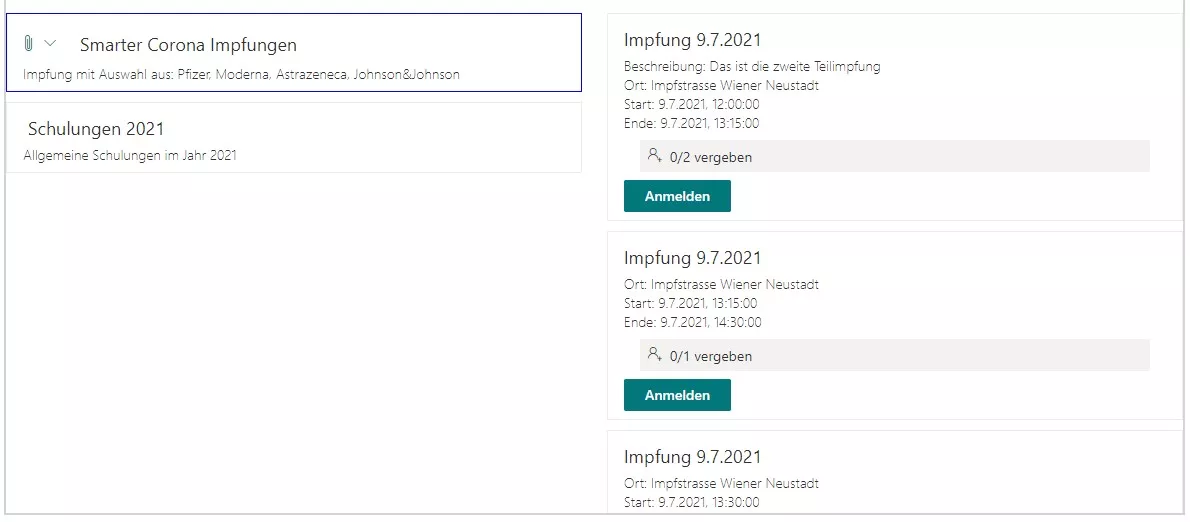
The app is organized in two layers. The first layer lists events. Each event can offer one or more sessions. We manage the data for events and sessions in two SharePoint lists.
When a user selects an event, all related sessions render in a column next to the events. From there, users can review available sessions and register for one or multiple sessions.
Anatomy of an Event

An event has a title and can include a description. You can also attach files for participants to download.

This makes it easy to provide additional information and materials.
Sessions for an Event
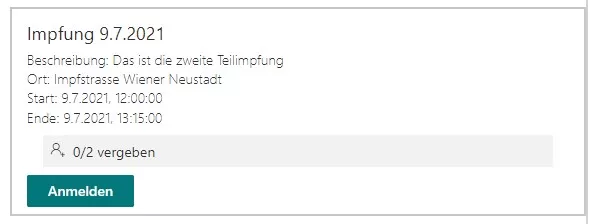
Each event can include one or more sessions. A session has a title, an optional description, a location, and a start and end time. Sessions can also include attachments for further reading. When a user is registered for a session, we display a clear indicator.
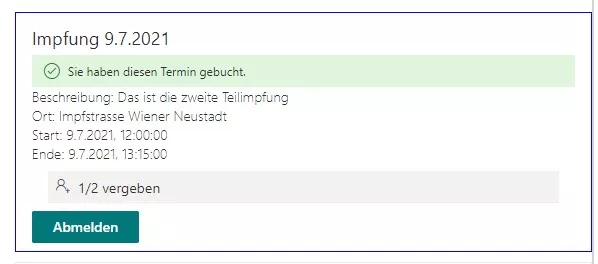
Users can also cancel their registration for a session if needed.
Each session defines a maximum number of participants. Once capacity is reached, we show a visual notice. Users can still join the waitlist for that session. If someone cancels, the next person on the waitlist automatically moves up and becomes registered.
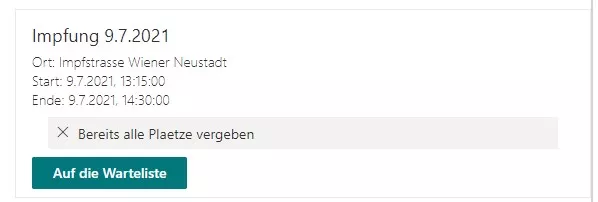
For a deeper look at the logic behind the waitlist, see our post on the implementation of the waitlist.
If you’re interested and would like to learn more about our SharePoint event-booking application, feel free to contact us.
- SharePoint
- Smarter Event Booking
- SPFx Web Part
- Event Management